Sunday, June 12, 2011

T-Mobile Angry Birds Live and Bike Lanes

Today I found two videos that are very funny on YouTube. The first video's title is "T-Mobile Angry Birds Live" and the second is "bike lanes". You really shouldn't miss these two videos as they are really very funny and special.

Check Leawo Free YouTube Downloader if you want to download them from YouTube - http://www.leawo.com/youtube-download/

  • T-Mobile Angry Birds Live

If you have a smartphone or iPod, you might have played the popular game Angry Birds many times. Angry Birds first appears on Apple's iOS devices, such as iPhone and iPod in December 2009, and costs $0.99 to download from App Store. The game has quickly become the most popular mobile phone game and has been downloaded more than 50 million times since its release.

A few days ago, T-Mobile hosted a commercial campaign which is very special. The commercial took place in Barcelona, Spain to show a live version of Angry Birds. It got in on the live shooting using a smartphone to control the real-time action. You can see red birds, blue birds, black birds and exploding green pigs in your real life. Maybe you've seen a lot of Angry Birds live shows before, but this one is the best. Here is the video of the commercial.


  • bike lanes

A guy was fined 50 dollars by a cop for riding his bicycle not in the bike lane. He is angry about this and thinks that it's unfair. This guy then made a short video depicting this case and showing some obstructions that keeps him from riding in the bike lane. Personally I support the bike rider. The video is a good public service announcement.

Thursday, May 26, 2011

Enjoy YouTube 3D Videos on NVIDIA 3D Vision machines in Firefox Web Browser

Nvidia 3D VisionYouTube has been working on 3D video streaming for a long time. I remember that last July, YouTube declared that it would fully support 3D video streaming in the next 12 months. Now the prediction becomes true. Today, Nvidia and Mozilla officially announced that they begin to support 3D HTML5 YouTube video streaming on desktop machines equipped with Nvidia 3D Vision hardware. Currently, web browsers don't support this new feature except Mozilla Firefox 4; and there have been thousands of 3D videos available on YouTube. From now on, you can enjoy videos in theater-quality and full-resolution 3D on YouTube on your laptops or PCs.

Several things are needed before you experience the stereoscopic 3D on YouTube, they are:

1. NVIDIA 3D Vision-equipped desktop machines
2. latest NVIDIA GeForce® drivers (version 275 or above)
3. Mozilla Firefox web browser (version 4 or above)
4. 3D glasses
5. Check the HTML5 option on the player of a YouTube 3D video.

Now check the 3D YouTube video below and tell us how do you like the new 3D experience.
And don't forget you can download YouTube videos with this Leawo Free YouTube Downloader.


Below is the full PR via Nvidia:

NVIDIA 3D Vision Video Now Available Worldwide on YouTube

Users Can Easily Share and Enjoy High-Quality, Stereoscopic 3D Videos on YouTube With Their NVIDIA 3D Vision PCs

SANTA CLARA, CA -- (Marketwire) -- 05/26/2011 -- NVIDIA today announced that YouTube is for the first time giving users the ability to view thousands of 3D videos in rich, high-quality stereoscopic 3D on their NVIDIA® 3D Vision™ PCs and notebooks when using the latest version of the Mozilla Firefox Web browser.

"We're excited to introduce HTML5 and WebM support to the thousands of 3D videos available on YouTube," said Jonathan Huang, 3D Product Manager at YouTube. "By embracing these open standards, NVIDIA 3D Vision users now have a great way of experiencing YouTube's library of 3D content."

"Firefox with 3D Vision creates a stunning and smooth 3D video experience using HTML5 video based on open standards," said Jay Sullivan, VP of Products at Mozilla. "3D Vision from NVIDIA is a great example of the rich, innovative experiences that are being built on top of the speed and graphics power that Firefox delivers to the Web."

"Sales of our ASUS G series notebooks with 3D Vision have been strong," said Ben Thacker, vice president of Systems Business Group-Distribution, ASUS North America. "Now that users can view YouTube videos in high-quality 3D, we expect interest in the ASUS 3D Vision models to grow significantly."

With a number of new, consumer 3D video cameras launched this year, YouTube's support of NVIDIA 3D Vision technology extends its existing commitment to 3D, enabling even more consumers and 3D enthusiasts to share their 3D videos online. With attractively priced models now available from JVC, Sony and other leading vendors, users now have another easy way to capture and post high-quality 3D videos on YouTube, 3DVisionLive.com, or even their own websites by embedding the YouTube 3D video player.

To further showcase the new YouTube stereoscopic 3D video streaming capabilities and some of the latest professional and user-generated 3D YouTube videos, NVIDIA is now hosting the top YouTube stereoscopic 3D videos on its 3D web community site at www.3DVisionLive.com/YT3D.

"YouTube 3D on an NVIDIA 3D Vision PC is an amazing experience," said Phil Eisler, general manager of 3D Vision at NVIDIA. "Now 3D Vision PC users can enjoy over 525 games, YouTube videos and photos in theater-quality, full-resolution 3D."

To view YouTube stereoscopic 3D videos an NVIDIA 3D Vision-equipped PC or notebook and the latest NVIDIA GeForce® drivers (version 275 or above) are required, as well as Firefox (version 4 or above), which includes support for HTML5 video streaming. Users will also need to select the HTML5 viewing option when viewing a YouTube 3D video: http://www.youtube.com/select_3d_mode.

In addition, with NVIDIA 3DTV Play™ software, users can connect their PCs to their 3D HDTVs to enjoy 3D YouTube videos on the "big screen" in the comfort of their living rooms.

Wednesday, May 25, 2011

Taylor Swift - Mean Music Video

Taylor Swift - Mean artworkLast Octerber, Taylor Swift released her third studio album 'Speak Now'. The album was very successful as it debuted with the year's biggest sales at 1.04 million. The song I'm going to introduce today is just from this album; it's 'Mean'. Last week, music video of 'Mean' was released. Both the song and the music video have received mainly positive reviews. Lots of fans think that it's the best video of hers since 'You Belong with Me'.

The music video of 'Mean' is here. You can also go to YouTube Taylor Swift VEVO's Channel to watch the clip. You can download it to your computer or smart phone with this YouTube Downloader program, so that you can watch it off-line.


Just as Billboard's review to the video, it 'encourages bully victims'. There are several bully victims in the video: Swift herself tied to the tracks by a villain, the boy reading a fashion magazine bullied by the football team in a locker room, the girl with a fast-food uniform bullied by a group of high schoolers, and the girl forced to eat in the school bathroom. In the end, all the bullied victims become 'big enough' and not be bullied any more.

I appreciate the theme of the video. It encourages people who are being bullied or discriminated that: don't give up, just hold up, as you're right and you will be successful in the end.

Good song and adorable video. 'Mean' was released on October 17, 2010, solely written by Swift herself. The music video premiered on May 6, 2011 and was directed by Declan Whitebloom.

Taylor Swift - Mean lyrics

You, with your words like knives
And swords and weapons that you use against me,
You, have knocked me off my feet again,
Got me feeling like I'm nothing.
You, with your voice like nails on a chalkboard
Calling me out when I'm wounded.
You, pickin' on the weaker man.

Well you can take me down,
With just one single blow.
But you don't know, what you don't know,

Someday, I'll be living in a big old city,
And all you're ever gonna be is mean.
Someday, I'll be big enough so you can't hit me,
And all you're ever gonna be is mean.
Why you gotta be so mean?

You, with your switching sides,
And your walk by lies and your humiliation
You, have pointed out my flaws again,
As if I don't already see them.
I walk with my head down,
Trying to block you out cause I'll never impress you
I just wanna feel okay again.

I bet you got pushed around,
Somebody made you cold,
But the cycle ends right now,
You can't lead me down that road,
You don't know, what you don't know

Someday, I'll be, living in a big old city,
And all you're ever gonna be is mean.
Someday, I'll be big enough so you can't hit me,
And all you're ever gonna be is mean.
Why you gotta be so mean?

And I can see you years from now in a bar,
Talking over a football game,
With that same big loud opinion but,
Nobody's listening,
Washed up and ranting about the same old bitter things,
Drunk and grumbling on about how I can't sing.

But all you are is mean,
All you are is mean.
And a liar, and pathetic, and alone in life,
And mean, and mean, and mean, and mean

But someday, I'll be, living in a big old city,
And all you're ever gonna be is mean. Yeah,
Someday, I'll be big enough so you can't hit me,
And all you're ever gonna be is mean.
Why you gotta be so ?
Someday, I'll be, living in a big old city,
And all you're ever gonna be is mean. Yeah,
Someday, I'll be big enough so you can't hit me,
And all you're ever gonna be is mean.
Why you gotta be so mean?

Tuesday, May 24, 2011

Beyonce Receives Billboard Millennium Award and Performs Run the World (Girls) at Billboard Music Awards

Recently, Beyonce has been the most popular singer all over the Internet and the real world. She premiered Run the World (Girls) music video last week. The video received millions of views everyday on YouTube. She has just received the Billboard Millennium Award at Billblard Music Awards aired on ABC on May 22. During the awards ceremony, the 29-year-old recording artist performs her latest single Run the World (Girls) with a lot of female dancers. Then she was presented the Millennium Award and made a speech to thank all the people suppports her.

Here is Beyoncé - Who Run The World Girls performance video on YouTube. You can download it for free with Leawo Free YouTube Download software.


Run The World (Girls) is the lead single off Beyonce's upcoming studio album 4. Last week, the accompanying music video was just released on American Idol and her official website. The video has drawn 20 million views on YouTube in just 7 days! However, the "female-empowerment" song video has attracted a flood of opposition - getting 46,460 dislikes among 138,522 votes. Beyonce performs the song on the stage of Billboard Music Awards and receives the Millennium Award, declaring that the ladies revolution has begun and women is going to rule the world.

Monday, May 23, 2011

YouTube Tests New Ad Scheme 'First Watch'

YouTube advertisingOnline video giant YouTube is just getting bigger and bigger. More and more companies want to improve their awareness through YouTube. Also, YouTube has been working on its advertising efficiency. It's said that YouTube is tesing a new advertisement scheme called 'First Watch'. So far there have been only two reports about the new advertising program. So I'm going to pick the keypoints from these two reports.

The first report is posted by New York Times
. Below are the keypoints of this report:
1. Recently, more and more Internet users' attitude towards 'pre-roll' ad over a video have softened.
2. The new ad program 'First Watch' is to expand the opportunities for advertisers. This kind of ad appears only once when a user views a video on YouTube the first time each day.
3. 'First Watch' is currently rather successful. As Baljeet Singh, senior product manager for video monetization at YouTube said:"The commercials on the youtube.com home page have been "highly successful[..]"
4. The First Watch program is only available to YouTube partners.
5. Here are some advertisers who have been involved in 'First Watch': Tommy Hilfiger, Hotels.com, the Lifetime cable channel, the Macy's unit of Macy's Inc. and Virgin Mobile.
6. The new ad delivery scheme is generating click through rates at about 1 percent, which is higher than normal advertising.
7. The advertisers declined to discuss what YouTube was charging them for the First Watch preroll. But it's "but less expensive" than YouTube YouTube charges normally.

The second report is from the TheNextWeb.com. Generally, it has some similar views with the first report. So I will not go into the detail of it.

Off topic:
Don' know how to download video from YouTube? You can check Leawo YouTube Downloader software, which is free and non-virus.

Sunday, May 22, 2011

Google Chrome, Lady Gaga, Edge of Glory, Advertisement

You might think the title of this post is so strange. I just don't know how to express myself about knowing this news in a sentence.

The news is that Google Chrome has shot a short video advertisement with Lady Gaga featuring her fans; and the background music of the video is Gaga's new single 'The Edge of Glory'! Little monsters, now paws up and watch this amazing video. To download it, you can use Leawo YouTube Downloader.


Google Chrome is my favorite web browser. Lady Gaga is one of my favorite pop singers. Google Chrome makes me browse web pages more faster than using other web browsers. Lady Gaga bring me good music and teach me to be proud of myself. I mean both Chrome and Gaga make me a better life to live. I appreciate them much.

Just as ChipChick said:"The commercial is quite brilliant and pretty much a win-win for both Gaga and Google, since it helps Gaga promote her upcoming Edge of Glory single as well as Google Chrome to all of Gaga's fans."

It took Gaga and Google 10 days to shoot the video ad (from May 8th to May 18th). Let's As Gaga's The Edge of Glory begins, the video shows that Gaga contacts her fans with Google's owned developed web browse – Chrome and tells the little monsters:"listen up, little monsters!". Then Gaga is seen running on a bridge. In fact, the bridge is Brooklyn Bridge in New York City. The video continues with Gaga's fans' own-made covers of The Edge of Glory. The videos switches scenes between Gaga dancing on the bridge and contacting with her fans in front of a computer, telling them 'you are all beautiful' and 'You're all superstars. You inspire me!'. It's a touching video though it's an advertisement.

And don't forget that Gaga's Born This Way album is going to hit the web tomorrow!

Thursday, May 19, 2011

Download Viva Riva! Movie Trailer from YouTube

Today we talk about an African movie - Viva Riva!.

African movies rarely have the ability to step into the International film big stage, except a few South African movies. Viva Riva! is an African movie and has successfully brought international attention, but it's a Congolese movie, surprise? The film was co-produced by Congo, South Africa and France and was the biggest winner at the 7th African Movie Academy Awards in 2011 winning awards including Best Production Design, Best Picture, Best Cinematography, Best Director, Best Supporting Actor and Best Supporting Actress.

YouTube hosts the official trailer of 'Viva Riva!' so you can go to YouTube and watch the trailer to have a general idea of the film. You can download Viva Riva! movie trailer from YouTube with Leawo YouTube Downloader, which is totally free.


'Viva Riva!' trailer is here: http://youtu.be/GyjBiIgafGY

Let me explain the film's name first. Riva is a Congolese male name; Viva is a new English word which means Hoory or Long Live. Riva is the main male character and has done some striking things in the film. It's a crime thriller film and was directed by Djo Tunda Wa Munga.

Storyline of Viva Riva!

Riva is a small time operator who has just returned to his hometown of Kinshasa, Congo after a decade away with a major score: a fortune in hijacked gasoline. Wads of cash in hand and out for a good time, Riva is soon entranced by beautiful night club denizen Nora, the kept woman of a local gangster. Into the mix comes an Angolan crime lord relentlessly seeking the return of his stolen shipment of gasoline. Director Djo Tunda Wa Munga's Kinshasa is a seductively vibrant, lawless, fuel-starved sprawl of shantytowns, gated villas, bordellos and nightclubs and Riva is its perfect embodiment.

Cast

Patsha Bay - Riva
Manie Malone - Nora
Hoji Fortuna - Cesar
Marlene Longage - the Commandant
Alex Herabo
Diplôme Amekindra

More information
  • Directed by Djo Tunda Wa Munga
  • Produced by Michaël Goldberg, Steven Markovitz, Djo Tunda Wa Munga, Boris Van Gils
  • Written by Djo Tunda Wa Munga
  • Editing by Yves Langlois, Pascal Latil
  • Release date(s) September 10, 2010 (Canada), February 18, 2011 (UK)
  • Running time 96 minutes
Screengrabs of the film

Viva Riva! screen 1

Viva Riva! screen 2

Viva Riva! screen 3

Viva Riva! screen 4

Viva Riva! screen 5

Viva Riva! screen 6

Wednesday, May 18, 2011

Lady Gaga - Hair Single Premiered

Haven't updated this blog for almost 7 months since last October. So sorry for my laziness. This blog is one of my multimedia theme blog series. As I love music, video and movies, I would update it with articles about viral videos, popular music singles or albums, and hot movies in the upcoming days. Thanks for your interest in my blog and hope I can offer you more and better information in the future.

Today I would like to talk about Mother Monster Lady Gaga's new 'Born This Way' single 'Hair'. Her BTW album will be released next Monday on May 23, 2011. 'Hair', the BTW single, was released to iTunes for digital download this Monday afternoon. Now listen to the song from the YouTube audio clip below and tell us how do you like it in the comment section.


To download the song, check Leawo Free YouTube Downloader.

So far 4 singles from the forthcoming album has been released, they are 'Born This Way', 'Judas', 'The Edge of Glory' and 'Hair'. Gaga has expressed who she is very well with these songs. 'Born This Way' tells us that we all born in a special way and just be confident no matter who you are. 'Judas' is a metaphor for the darkness in your mind, "honoring your darkness in order to bring yourself into the light", as Gaga explained the song's meaning. 'The Edge of Glory' is inspired by the death of her grandfather. As for 'Hair', it's similar to 'Born This Way', preaches the importance of embracing your personality and being comfortable with who you are.

From the song, I think Gaga remembers where she came from and how she grew her personality in her adolescence. Gaga was thought to be different from her classmates whe she was in high school. At that time, her look, her clothes and her hair are 'wired' in her parents' eyes. Previously, Gaga said that "My mom would even cut my hair when I was asleep because I had really long split hairs, because I liked it really long like a hippy", as reported by Contact Music. As you can imagine the feeling that Gaga wants to express in the song.

Here is the lyrics of Lady Gaga – Hair

[Lady Gaga - Verse 1]

Whenever I dress cool,
My parents put up a fight
And if I'm a hotshot,
Mom will cut hair at night
In the morning I'm sure of my identity
I scream Mom and Dad
Why can't I be who I wanna be?

I just wanna be myself,
And I want you to love me for who I am
I just wanna be myself,
And I want you to know, I am my Hair

[Chorus]

I've had enough
This is my prayer
That I'll die living just as free as my hair

I've had enough
This is my prayer
That I'll die living just as free as my hair

I've had enough
I'm not a freak
I must keep fighting to stay cool on the streets

I've had enough, enough, enough
And this is my prayer, I swear
I'm as free as my hair

[Lady Gaga - Verse 2]

Sometimes I want to rock on some highlights
Just because
I want my friend to think that I am dynamite
And on party, roxy, high school dance
I got my bangs too hard
That I don't stand a chance
A chance

I just wanna be myself,
And I want you to love me for who I am
I just wanna be myself,
And I want you to know, I am my Hair

[Chorus]
I've had enough
This is my prayer
That I'll die living just as free as my hair

I've had enough
This is my prayer
That I'll die living just as free as my hair

I've had enough
I'm not a freak
I must keep fighting to stay cool on the streets

I've had enough, enough, enough
And this is my prayer, I swear
I'm as free as my hair

[Bridge]

I just want to be free, I just want to be me
And I want lots of friends that invite me to their parties

I don't wanna change,
And I don't wanna be ashamed
I'm the spirit of my Hair
It's all the glory that I bare
I am my Hair!

I'm my hair, I am my hair
It's all the glory that I bare
I'm my hair-am my hair
I'm my hair-am my hair yeah!

[Chorus]

I've had enough
This is my prayer
That I'll die living just as free as my hair

I've had enough
This is my prayer
That I'll die living just as free as my hair

I've had enough
I'm not a freak
I must keep fighting to stay cool on the streets

I've had enough, enough, enough
And this is my prayer, I swear
I'm as free as my hair

Sunday, October 10, 2010

YouTube Uploading Tips for Video Editing Tools on Apple

If your video uploaded to YouTube is in high definition, YouTube will offers the option to view the video in high definition, such as 1080p resolution. Online video in high definition is good for both uploader and YouTube, and will be more and more popular in the future.

*You can use Leawo Free YouTube Downloader to download normal YouTube videos to your computer. The paid version of Leawo YouTube Downloader can download high definition videos from YouTube.*

Some of the users may have these questions: How to upload videos in high definition to YouTube? How to use video editing tools to optimize the video for uploading to YouTube?

Below tips are for the Apple users as they use the video editing tools for YouTube uploads.

If you're a Quicktime Pro, Finalcut Pro, or iMovies user, check out the following tips on how to export your video files and get the best results out of uploading to YouTube and the transcoding of your files.

* iMovie:
File -> Export -> Compress movie for: Expert Settings -> Share -> Export: Movie to QuickTime Movie -> Options
* Finalcut Pro:
File -> Export -> Using Quicktime Conversion -> Options
* QuickTime Pro:
File -> Export -> Export: Movie to QuickTime Movie -> Options

In the Options box:

1. In the Video section set the following parameters:
* Compression Type: H.264
* Frame Rate: 30
* Data Rate: Automatic
(if you choose to restrict the Data Rate, make sure to choose the highest value acceptable to you - more bits = better quality)
* Key Frames: Automatic
* Frame Reording: Unchecked

2. In the Video section click "Size":
Dimensions: Set this to the original size of your video (Note: HD resolutions preferred- 1280x720 or 1920x1080)

3. In the "Prepare for internet Streaming" section:
Select the "Prepare for internet Streaming" and choose "Fast Start" from the drop-down menu.


4. In the Audio section, make sure that the audio codec is AAC. Always use AAC as the preferred audio codec.

5. Once you've made all of these selections, click the "OK" button to save your preferences.

6. Add a title to the video file and click the "Save" button to save your edited version of your movie. Your project will then be exported and be ready to upload to YouTube.

Note:
The tips in green are important. Please make sure you format your files accordingly.

Source is YouTube World.

Saturday, October 9, 2010

How to Download Google Videos and Convert to AVI

This question actually involves two aspects: download Google videos from video.google.com first and then convert them to AVI format.

The tutorial below will take Leawo Free YouTube Downloader and Leawo Free FLV Converter for example to show you how to download Google videos and convert downloaded Google videos to AVI. Leawo Free YouTube Downloader can download Google Videos, videos from YouTube, and other video sharing websites. And Leawo Free FLV Converter can convert those downloaded Google videos to other video formats like AVI and many other more.

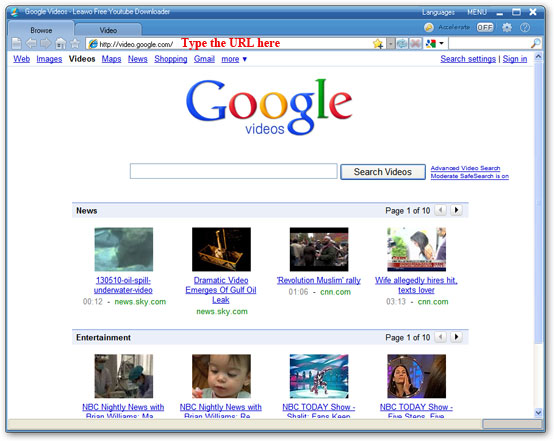
Step 1: Launch Leawo Free YouTube Downlaoder, type video.google.com in the address bar.

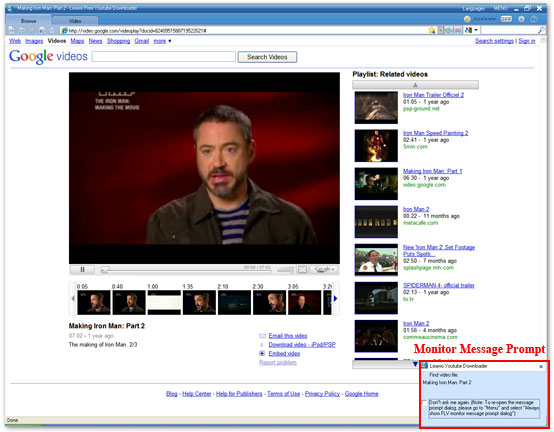
Step 2: Search and choose one Google video to play. A monitor message prompt from the right bottom corner of screen will remind users that a specific video has been found, ignore it or choose "Don't Ask Me Again" to close this prompt dialog.

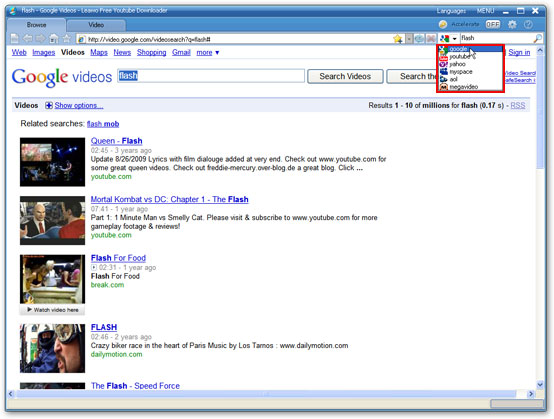
Tips: you can also enter the video key words in the searching bar, and choose the target video site where the searching engine is going to perform the video search.

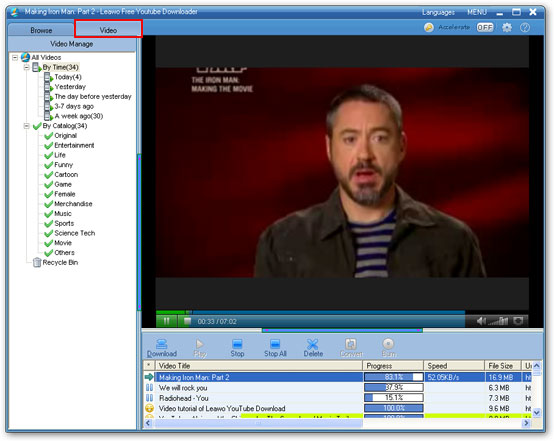
Step 3: Click "Video" tab to check the downloading process of the selected Google video and watch it in the built-in FLV player at the same time.

Step 4: When the downloading completes, indicated by a yellow smiley, click "Download" button to save the downloaded Google video to the appointed folder on your PC. A green tick will appear when the saving process is finished.

Step 5: Click "Convert" button to convert the downloaded Google video to AVI if you want the format conversion.

Step 6: Leawo Free FLV Converter will be invoked now. Select AVI as the target video format and click the green button to convert Google video to AVI immediately.

Reshipment from YouTube World.

Friday, October 8, 2010

YouTube Rentals Beta - How to Become a YouTube Partner (Part Two)


The YouTube Rentals Beta I'm going to introduce is a pay-to-view model on YouTube. It provides content owners a new way to generate revenue from their home-made videos on the site. YouTube Rentals allows partners the flexibility to benefit from a variety of videos, complete control over their video content and pioneering use of the world's largest online video community.

(Want to download videos from YouTube and all other video sites? Just use
Leawo Free YouTube Downloader.)

Currently, the YouTube Rentals Beta service is available only to the content owners in the US.

Want your content on YouTube be available for people to rent? You can
Apply Now.

Create the best rental experience

From the YouTube Rentals service, partners can get unprecedented flexibility and control over monetization, marketing, and distribution for online video.

  • Full control of your rights, dissemination of time, rental prices and lease.
  • You can choose to provide some content via the ad-supported model or make some free content for promotional purposes, to maximize your control over profit, marketing and distribution strategies.
  • Try using different prices, service time and the lease to improve the attractiveness of a specific video.
  • You can grow your audience on YouTube, learn what they like to watch, and tailor your content offering by tracking view trends.

Expand your audience and profit

If you are a YouTube partner, you will be able to benefit from this new revenue opportunities, and expand your influence via the world's largest online video community.

  • Learn a new way to distribute and earn profit from your online content. Create a new revenue stream by making video archived, offline video, or new videos available for rent online.
  • To communicate directly with your audience, announce new uploaded content or offline published content.
  • Exposure to a large audience. YouTube is the largest online video site and the third largest site in the world. (comScore,2009)

If you are already a YouTube partner and still have a question, you can go to the
YouTube Rental Support page.

YouTube Rentals Beta - How to Become a YouTube Partner (Part Two)
is over. In the next part, I will introduce how to become a YouTube partner.

Source is YouTube World.

Thursday, September 30, 2010

How to Become a YouTube Partner (Part One) - Benefits of YouTube Partner

If you have quality original videos and expanding audience on YouTube, you can apply for a YouTube partner to earn money from the plan.

Benefits of YouTube partner
YouTube is the biggest video sharing website in the world. Its traffic is much more than its competitors. (
Leawo Free YouTube Downloader is a perfect tool to download and convert videos from YouTube and other websites, click here to read its manual.)

Being a YouTube partner has the following benefits listed below:

1. Revenue

As a YouTube partner, you will be able to enjoy opportunities to create revenue.

  • Earn money from the embedded advertisement on your video and advertisement beside your video.

  • Share income from your video rental.

  • Gain the opportunies of co-marketing and branded entertainment with top brand advertiser.

  • Use your own marketing channel to sell your own advertisement
2. Video statistics analytics

Use YouTube's Insight analytics tools to optimize your existing content and create more targeted content to satisfy your audience and advertisers.

  • Learn more characteristics of your audience and what they are watching.

  • Learn more about how your audience find your video.

  • Learn more about how are you and your competitors doing in terms of competition.

  • Learn what content you have is the most popular & engaging.

  • Tells you where your video is really successful, and where it is not good enough at a video level.

3. Protection

YouTube can protect both of your video content and brand.

  • Protects the integrity of your brand through the branded channel options available only to partners.

  • In addition, YouTube offers many Content Management tools for copyright protection that anyone may use, regardless of whether they are in a partnership with YouTube.

  • Rental of your videos are delivered via secure streaming way, to avoid downloading by other people.

4. Video quality

YouTube will process your uploaded video in reliable way, and display them on YouTube at the highest resolution as far as possible.

  • To those videos which are hot and attractive, YouTube will offer HD version accordingly.

  • Offers aspect ration of 16:9 for video players.

  • Join the ranks of YouTube's other high-quality video providers already in the Partner Program.

How to Become a YouTube Partner (Part One) is over. In the next part, I'm going to tell you the
YouTube video rental plan and how to become a YouTube partner.

Source is YouTube World.

Tuesday, September 28, 2010

How to Download Online Videos

If the online video you come across is played with an Adobe Flash Player, then you may use Leawo Free YouTube Downloader to download it off to your computer! Leawo Free YouTube Downloader is a free all-in-one video downloader which can download videos from YouTube, Google Video, Dailymotion and other video sharing websites as long as they are played with Adobe Flash Player.

Suppose you are going to download videos with this video downloader, the easiest way is to drag the YouTube video thumbnail to the hover window of Leawo Free YouTube Downloader and then the video downloader will begin the downloading automatically.

Of course, you can also type the URL in the program address bar, this applies to all the video sites, for example, Google Video. Browse videos in its built-in FLV player with high speed, then download them to your appointed folder within just a click, and convert them directly to the format you want for your phone and portable media player.

The tutorial below will take YouTube and Google Video respectively for example to show how to free download video.

Step 1: Launch Leawo Free YouTube Downloader, click settings icon, choose "Show hover window on program startup" in "General" tab from the pop-up window.

Step 2: Browse YouTube videos in IE or any browser, choose the one you want to download, and then drag the selected video thumbnail to the hover window of Leawo Free YouTube Downloader.

Step 3: Click "Video" tab to check the video downloading progress. When the downloading completes, double click the downloaded video, you could play it with the built-in player, or click "Download" button to save the downloaded video to your PC.

Step 4: For downloading Google video and other online videos, type the URL in the address bar and choose one Google video to play. Then repeat the Step 3 shown above.

Supported video / audio formats for uploading to YouTube

YouTube accepts a wide range of video formats uploaded by users. The below video formats are all accepted by YouTube. Some of them have the best visual effect on YouTube. You can take a look at them and tune your video formats for YouTube.

List of some well-known formats which YouTube supports:

WebM files (Vp8 video codec and Vorbis Audio codec)
.MPEG4, 3GPP and MOV files - (typically supporting h264 and mpeg4 video codecs and AAC audio codec)
.AVI (Many cameras output this format - typically the video codec is MJPEG and audio is PCM)
.MPEGPS (Typically supporting MPEG2 video codec and MP2 audio)
.WMV
.MP4
.FLV (Adobe - FLV1 video codec, MP3 audio)

YouTube accepts all of the above video formats uploaded from users. To most users, we find that the below video settings have the best visual effect:
Video format: H.264, MPEG-2 or MPEG-4 recommended
Aspect ratio: Original screen aspect ration without top or bottom black border, for example, 4:3, 16:9
Resolution: 640x360 (16:9) or 480x360 (4:3) Recommended
Audio format: MP3 or AAC Recommended
FPS (Frame per second): 30
Video length limit: 15 minutes (2 to 3 minutes recommended)
Video size limit: 1 GB

Tips:
a. If you think your video won't be accepted by YouTube, you can convert it to video format MPEG4 with audio format MP3 to get the best visual effect.

b. To convert any video format to the 'YouTube supported video formats', you can use some free or paid video converter. Good Freeware for this purpose are FormatFactory or FFMPEG. The former is graphic user interface, while the latter is command line user interface.

c. By default, Windows Movie Maker will save your video item as . MSWMM file. MSWMM is project file, which is not accepted by YouTube on uploading. To upload your Windows Movie Maker video to YouTube, please choose 'save it to my computer' option to save your video project as an accepted video format, and then you can upload the saved video to YouTube.

d. To download videos from YouTube, you can use Leawo Free YouTube Downloader, which is free and clean.

Source is YouTube World.

Saturday, June 12, 2010

waka waka - Shakira's song for the 2010 FIFA World Cup South Africa

Are you ready to the imminent 2010 FIFA World Cup South Africa? Because this great quadrennial worldwide football game is coming today on Jun. 11, 2010!

The World Cup theme song - waka waka (This Time For Africa), is created and sang by Shakira, a famous Colombia Latin singer. Waka waka is a verb in the language of Creole in Africa, its meaning is "flame, shine, warmly burn". Added the the South Africa's guitar solo background music with rhythm , this song has a strong flavor of Africa. Shakira will performance this song together with South Africa's local band Freshlyground on this World Cup closing ceremony.

As the World Cup theme song singer, the Latin singing queen Shakira said, "African music has the power of inspiring, and be reckoned in the global popular culture. I'm very proud that waka waka (This Time For Africa) is chosen to be the theme song of 2010 FIFA World Cup South Africa. FIFA World Cup is a worldwide game; it closely links together people from different countries, different races and different area, which is what I want to express in this song." At the same time, she is very happy to cooperate with the most famous band in South Africa - Freshlyground.

Below is the music video by Shakira featuring Freshlyground performing Waka Waka (This Time for Africa) (The Official 2010 FIFA World Cup (TM) Song). (C) 2010 Sony Music Entertainment on YouTube. You can use Leawo Free YouTube Downloader to download this music video to your computer hard disk.

Source is
http://youtubeking10.blogspot.com/2010/06/waka-waka-shakiras-song-for-2010-fifa.html

Friday, May 28, 2010

Top 10 must have software in your computer

What are your must have programs in your computer? You need the applications when you have a computer and you can die without it.

This is my top 10 list

1. Windows XP:) Of cource, this is Operationg System, you cannot run any program without it.

2. Microsoft Office. Mine is 2003. 2007 and 2010 are available on the Internet.

3. Web Browser. I use Mozilla Firefox 3.5.9 currently. Mozilla Firefox supports a lot of plugins, so it is very strong. Though IE still has the biggest market share, I don't like IE.

4. Real - time chat tool: Windows Live! Messenger

5. Leawo YouTube Downloader. It is an entertainment application, and is free. I use it to download and accelerate web videos.

6. FlashGet

7. Kaspersky Internet Security. It is the best antivirus software on the planet.

8. VLC media player. This player can open and almost all video files.

9. Adobe Reader 9.0, e-book reader. It can read PDF and other e-book files.

10. RoboForm. It can remember your account names and passwords and automatically fill login forms.

After top 10

11. War Craft 3 -->> entertainment apps :)

12. Format Factory. It can convert almost all videos and is totally free.

13. Winrar, zip and unzip files

14. Adobe Photoshop, the best photo editors

15. Foxmail, e-mail manager, write and receive e-mails.

16. gimp

17. iTunes music player

Source is http://youtubeking10.blogspot.com/2010/05/top-10-must-have-software-in-your.html

Wednesday, May 26, 2010

Top Ten YouTube videos: the highest one with 186 million views

ReadWriteWeb, the famous United States blog named a "Top Ten YouTube videos" list in January this year. "Hari's comedy act" headed in the list with 186 million times views.

These top ten videos are as follows:

1. Hari's comedy act (186,361,277 views by January)

2. Charlie bit my finger - again! (148,757,751 views by January, 188,307,246 views by now)
3. Evolution of Dance (134,412,139 views by January, 143,163,641 views by now)

4. Miley Cyrus - 7 Things - Official Music Video (108,577,069 views by January, 118,135,172 views by now)

5. Jeff Dunham - Achmed the Dead Terroris (104,013,553 views by January, 111,796,626 views by now)

6. Hahaha - Small daring boy (103,262,937 views by January, 118,908,247 views by now)

7. Lo que tú Quieras Oír (99,291,111 views, 100,699,985 views by now)

8. Pitbull - I Know You Want Me (92,408,735 views by January, 119,630,385 views by now)

9. Britains Got Talent 2009 (85,126,780 views by January, 92,375,341 views, embed code not permitted)
http://www.youtube.com/watch?v=9lp0IWv8QZY

10. Timbaland – Apologize (81,299,096 views by January, 85,274,802 views by now)

To get smooth view of these top ten YouTube videos or HD videos, and download YouTube for free,you can use this free YouTube Downloader. It can eliminate buffering of video, and download almost all videos from the Internet.

Source is http://youtubeking10.blogspot.com/2010/05/top-ten-youtube-video-highest-one-with.html

Thursday, September 24, 2009

Customize a Flash Video Player with playlist in the easiest way

Many people think it’s very difficult to realize playing videos on their own website, blog, forum or e-store, because it’s difficult for them, who don’t know any coding knowledge, to customize an own-branded web Flash video player like YouTube player for web. So if they want to play videos on their own website, they have to compress their videos size to 10 mins or smaller and upload to YouTube, and then get the embed codes of the videos for embedding onto website. Although they know the drawbacks like the videos will belong to YouTube, the video quality will be lower, etc.

In fact, it’s not difficult to customize a skinning web FLV player any more. Here, I will introduce a way to customize a skinning web FLV player with full-screen capability and playlist. At present, this way is the easiest one, which only needs a few mouse clicks.

Below is the tutorial shows how to customize the above flash video player with a few mouse-clicks on Moyea Web Player.

Step 1: Open Moyea Web Player on your PC

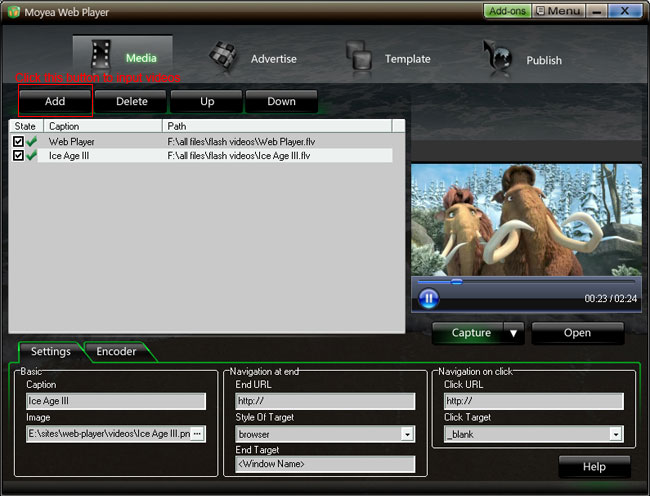
Step 2: Input flash videos you want to play on webpage into Moyea Web Player (If your videos are not flash videos, please convert them to).

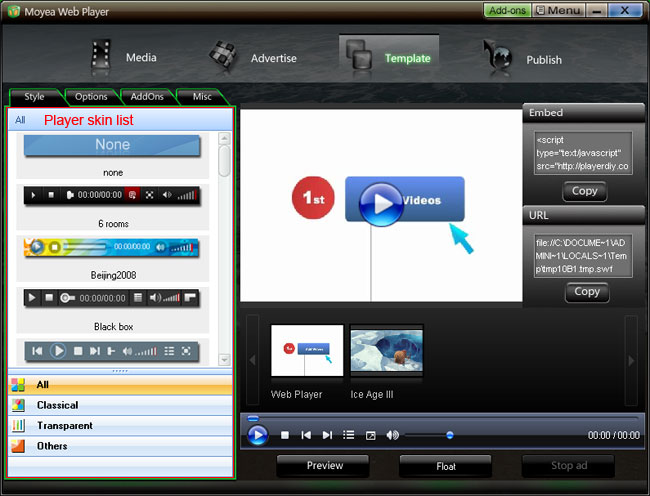
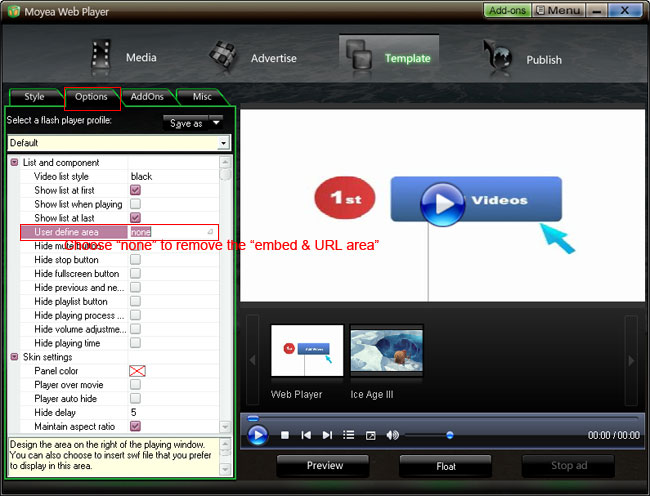
Step 3: Choose a player skin(here, I use the default one), and remove the embed code area.


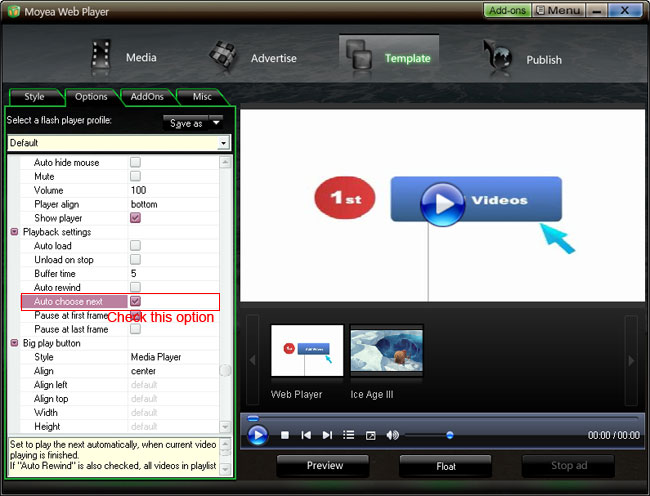
Check "Auto choose next" to make the player can player next video automatically

Step 4: Click “Publish” button to generate a web flash video player and other related files (Note: if you want to get a separate playlist file, please check “Out File”)

Step 5: Upload all the published files except the index.html file, to the same folder of your web server

Step 6: Embed the generated web video player onto your webpage with the embed code below (you can get it on the generated index.html file):


Player will show here

Note:
1. No tag outside the embed code.

2. mwplayer.swf is the actual flash video player. If it resides in another directory, then point to it with a relative path (e.g. /player/mwplayer.swf) or an absolute path (e.g. http://www.yourdomain.com/player/mwplayer.swf ).
For example:


Player will show here

3. '500','450' is the width and the height of the player, you could change them to change the player size.

Step 7: The flash video player will appear on your website. Have a look at the above demo.

Thursday, September 17, 2009

Video Search And Google Analytics Plugins Is Released For Web FLV Player

Video search plugin and Google analytics plugin were released in Moyea to make the web FLV player, which created with Moyea Web Player, get the abilities of searching and playing videos from video sharing sites and abilities of tracking events of it and displaying the results in Google analytics account.


Moyea Web Player is a web FLV player creator. It can be used to create skinning streaming FLV player and FLV player for web sites to play streaming videos and flash videos with no any coding. And its various capabilities can be got extended via addons.


After released advertising and watermark plugins in May for extending the functions of the created web FLV player on advertising and branding, these days, Moyea has released Video search plugin and Google analytics plugin to enable the created web FLV player to play videos from video sharing sites and to track the events within it.


Video Search Plugin:Video Search Plugin was released on Sep.4, 2009. With it, the web FLV player, which created with Moyea Web Player, has the ability of searching and playing videos from almost all video sharing sites like YouTube, Google video, Dailymotion, etc., and the player owners don’t need to host any video on their web sever but users can view any video they want to watch. It’s a so powerful and useful plugin for web FLV players!


Google Analytics Plugin:Google Analytics Plugin is a free plugin released on Sep.1, 2009. It is used to track the events within the created web FLV player and display the results in Google analytics account, so that player owns can easily know and analyze the information of the player and the videos in player.


Google Analytics is not strange for most of internet users, but most of them only know it’s a good internet tool for tracking and analyzing information of website like traffic, entering keywords, bounce rate, etc. In fact, it also can be used to track and analyze events in web FLV players, that’s because Google has public the API to enable developers to develop plugins to make it for relevant use.


Moyea Web Player with easy-to-use feature is on its way to becoming more and more professional web FLV player creator via extending its capability with addons. And no doubt, these two plugins with functions to enable web FLV player to search and play videos from internet, to track events within web FLV player, can help it become more powerful and professional.


More information:

Company site: http://www.moyeamedia.com

Product site: http://www.playerdiy.com

Product page: http://www.playerdiy.com/configuration/addons/vidsearch.html http://www.playerdiy.com/configuration/addons/googlytics.html

Source is FLV player DIY

Friday, March 13, 2009

How to convert SWF to FLV

1. Download Moyea SWF4Tube Converter, http://www.playerdiy.com/flash-video-converters.html
Launch it on PC. Moyea SWF4Tube Converter is a tool to convert SWF to FLV, MOV, MP4, 3GP,3G2.

2. Input Flash Files:
①Click "Browse…"tab to input flash files from your computer folder. Click "V" immediately behind, a drop list will cascade automatically. Choose among "From Folder", "From IE cache" and "Flash Projector", and there will be a dialog box accordingly pops up. Choose files in those dialog boxes and click "OK". On the right of pane are the properties of current playing flash.

Tips: On opening the window, you will get "Single Mode" conversion, if you have many files to convert; you are suggested to choose "Batch Mode" on the top left.


3. Export Settings
Click "Export" tab in menu, and you will get the following windows.


4. Conversion
①Click "Convert" in the menu, the program will automatically start performance test to find the best capture speed, if you did not checked "No performance testing". To guarantee an accurate result, you are suggested to interact with the flash when it asks you to.

②After performance testing, the program will come with the capture interface, then you can process your manual capture flash file for conversion.