You might think the title of this post is so strange. I just don't know how to express myself about knowing this news in a sentence.
The news is that Google Chrome has shot a short video advertisement with Lady Gaga featuring her fans; and the background music of the video is Gaga's new single 'The Edge of Glory'! Little monsters, now paws up and watch this amazing video. To download it, you can use Leawo YouTube Downloader.
Google Chrome is my favorite web browser. Lady Gaga is one of my favorite pop singers. Google Chrome makes me browse web pages more faster than using other web browsers. Lady Gaga bring me good music and teach me to be proud of myself. I mean both Chrome and Gaga make me a better life to live. I appreciate them much.
Just as ChipChick said:"The commercial is quite brilliant and pretty much a win-win for both Gaga and Google, since it helps Gaga promote her upcoming Edge of Glory single as well as Google Chrome to all of Gaga's fans."
It took Gaga and Google 10 days to shoot the video ad (from May 8th to May 18th). Let's As Gaga's The Edge of Glory begins, the video shows that Gaga contacts her fans with Google's owned developed web browse – Chrome and tells the little monsters:"listen up, little monsters!". Then Gaga is seen running on a bridge. In fact, the bridge is Brooklyn Bridge in New York City. The video continues with Gaga's fans' own-made covers of The Edge of Glory. The videos switches scenes between Gaga dancing on the bridge and contacting with her fans in front of a computer, telling them 'you are all beautiful' and 'You're all superstars. You inspire me!'. It's a touching video though it's an advertisement.
And don't forget that Gaga's Born This Way album is going to hit the web tomorrow!
Sunday, May 22, 2011

Thursday, May 19, 2011
Download Viva Riva! Movie Trailer from YouTube
 Today we talk about an African movie - Viva Riva!.
African movies rarely have the ability to step into the International film big stage, except a few South African movies. Viva Riva! is an African movie and has successfully brought international attention, but it's a Congolese movie, surprise? The film was co-produced by Congo, South Africa and France and was the biggest winner at the 7th African Movie Academy Awards in 2011 winning awards including Best Production Design, Best Picture, Best Cinematography, Best Director, Best Supporting Actor and Best Supporting Actress.
YouTube hosts the official trailer of 'Viva Riva!' so you can go to YouTube and watch the trailer to have a general idea of the film. You can download Viva Riva! movie trailer from YouTube with Leawo YouTube Downloader, which is totally free.
'Viva Riva!' trailer is here: http://youtu.be/GyjBiIgafGY
Let me explain the film's name first. Riva is a Congolese male name; Viva is a new English word which means Hoory or Long Live. Riva is the main male character and has done some striking things in the film. It's a crime thriller film and was directed by Djo Tunda Wa Munga.
Storyline of Viva Riva!
Riva is a small time operator who has just returned to his hometown of Kinshasa, Congo after a decade away with a major score: a fortune in hijacked gasoline. Wads of cash in hand and out for a good time, Riva is soon entranced by beautiful night club denizen Nora, the kept woman of a local gangster. Into the mix comes an Angolan crime lord relentlessly seeking the return of his stolen shipment of gasoline. Director Djo Tunda Wa Munga's Kinshasa is a seductively vibrant, lawless, fuel-starved sprawl of shantytowns, gated villas, bordellos and nightclubs and Riva is its perfect embodiment.
Cast
Patsha Bay - Riva
Manie Malone - Nora
Hoji Fortuna - Cesar
Marlene Longage - the Commandant
Alex Herabo
Diplôme Amekindra
More information
- Directed by Djo Tunda Wa Munga
- Produced by Michaël Goldberg, Steven Markovitz, Djo Tunda Wa Munga, Boris Van Gils
- Written by Djo Tunda Wa Munga
- Editing by Yves Langlois, Pascal Latil
- Release date(s) September 10, 2010 (Canada), February 18, 2011 (UK)
- Running time 96 minutes
Screengrabs of the film


Wednesday, May 18, 2011
Lady Gaga - Hair Single Premiered
Haven't updated this blog for almost 7 months since last October. So sorry for my laziness. This blog is one of my multimedia theme blog series. As I love music, video and movies, I would update it with articles about viral videos, popular music singles or albums, and hot movies in the upcoming days. Thanks for your interest in my blog and hope I can offer you more and better information in the future.
Today I would like to talk about Mother Monster Lady Gaga's new 'Born This Way' single 'Hair'. Her BTW album will be released next Monday on May 23, 2011. 'Hair', the BTW single, was released to iTunes for digital download this Monday afternoon. Now listen to the song from the YouTube audio clip below and tell us how do you like it in the comment section.
To download the song, check Leawo Free YouTube Downloader.
So far 4 singles from the forthcoming album has been released, they are 'Born This Way', 'Judas', 'The Edge of Glory' and 'Hair'. Gaga has expressed who she is very well with these songs. 'Born This Way' tells us that we all born in a special way and just be confident no matter who you are. 'Judas' is a metaphor for the darkness in your mind, "honoring your darkness in order to bring yourself into the light", as Gaga explained the song's meaning. 'The Edge of Glory' is inspired by the death of her grandfather. As for 'Hair', it's similar to 'Born This Way', preaches the importance of embracing your personality and being comfortable with who you are.
From the song, I think Gaga remembers where she came from and how she grew her personality in her adolescence. Gaga was thought to be different from her classmates whe she was in high school. At that time, her look, her clothes and her hair are 'wired' in her parents' eyes. Previously, Gaga said that "My mom would even cut my hair when I was asleep because I had really long split hairs, because I liked it really long like a hippy", as reported by Contact Music. As you can imagine the feeling that Gaga wants to express in the song.
Here is the lyrics of Lady Gaga – Hair
[Lady Gaga - Verse 1]
Whenever I dress cool,
My parents put up a fight
And if I'm a hotshot,
Mom will cut hair at night
In the morning I'm sure of my identity
I scream Mom and Dad
Why can't I be who I wanna be?
I just wanna be myself,
And I want you to love me for who I am
I just wanna be myself,
And I want you to know, I am my Hair
[Chorus]
I've had enough
This is my prayer
That I'll die living just as free as my hair
I've had enough
This is my prayer
That I'll die living just as free as my hair
I've had enough
I'm not a freak
I must keep fighting to stay cool on the streets
I've had enough, enough, enough
And this is my prayer, I swear
I'm as free as my hair
[Lady Gaga - Verse 2]
Sometimes I want to rock on some highlights
Just because
I want my friend to think that I am dynamite
And on party, roxy, high school dance
I got my bangs too hard
That I don't stand a chance
A chance
I just wanna be myself,
And I want you to love me for who I am
I just wanna be myself,
And I want you to know, I am my Hair
[Chorus]
I've had enough
This is my prayer
That I'll die living just as free as my hair
I've had enough
This is my prayer
That I'll die living just as free as my hair
I've had enough
I'm not a freak
I must keep fighting to stay cool on the streets
I've had enough, enough, enough
And this is my prayer, I swear
I'm as free as my hair
[Bridge]
I just want to be free, I just want to be me
And I want lots of friends that invite me to their parties
I don't wanna change,
And I don't wanna be ashamed
I'm the spirit of my Hair
It's all the glory that I bare
I am my Hair!
I'm my hair, I am my hair
It's all the glory that I bare
I'm my hair-am my hair
I'm my hair-am my hair yeah!
[Chorus]
I've had enough
This is my prayer
That I'll die living just as free as my hair
I've had enough
This is my prayer
That I'll die living just as free as my hair
I've had enough
I'm not a freak
I must keep fighting to stay cool on the streets
I've had enough, enough, enough
And this is my prayer, I swear
I'm as free as my hair
Today I would like to talk about Mother Monster Lady Gaga's new 'Born This Way' single 'Hair'. Her BTW album will be released next Monday on May 23, 2011. 'Hair', the BTW single, was released to iTunes for digital download this Monday afternoon. Now listen to the song from the YouTube audio clip below and tell us how do you like it in the comment section.
To download the song, check Leawo Free YouTube Downloader.
So far 4 singles from the forthcoming album has been released, they are 'Born This Way', 'Judas', 'The Edge of Glory' and 'Hair'. Gaga has expressed who she is very well with these songs. 'Born This Way' tells us that we all born in a special way and just be confident no matter who you are. 'Judas' is a metaphor for the darkness in your mind, "honoring your darkness in order to bring yourself into the light", as Gaga explained the song's meaning. 'The Edge of Glory' is inspired by the death of her grandfather. As for 'Hair', it's similar to 'Born This Way', preaches the importance of embracing your personality and being comfortable with who you are.
From the song, I think Gaga remembers where she came from and how she grew her personality in her adolescence. Gaga was thought to be different from her classmates whe she was in high school. At that time, her look, her clothes and her hair are 'wired' in her parents' eyes. Previously, Gaga said that "My mom would even cut my hair when I was asleep because I had really long split hairs, because I liked it really long like a hippy", as reported by Contact Music. As you can imagine the feeling that Gaga wants to express in the song.
Here is the lyrics of Lady Gaga – Hair
[Lady Gaga - Verse 1]
Whenever I dress cool,
My parents put up a fight
And if I'm a hotshot,
Mom will cut hair at night
In the morning I'm sure of my identity
I scream Mom and Dad
Why can't I be who I wanna be?
I just wanna be myself,
And I want you to love me for who I am
I just wanna be myself,
And I want you to know, I am my Hair
[Chorus]
I've had enough
This is my prayer
That I'll die living just as free as my hair
I've had enough
This is my prayer
That I'll die living just as free as my hair
I've had enough
I'm not a freak
I must keep fighting to stay cool on the streets
I've had enough, enough, enough
And this is my prayer, I swear
I'm as free as my hair
[Lady Gaga - Verse 2]
Sometimes I want to rock on some highlights
Just because
I want my friend to think that I am dynamite
And on party, roxy, high school dance
I got my bangs too hard
That I don't stand a chance
A chance
I just wanna be myself,
And I want you to love me for who I am
I just wanna be myself,
And I want you to know, I am my Hair
[Chorus]
I've had enough
This is my prayer
That I'll die living just as free as my hair
I've had enough
This is my prayer
That I'll die living just as free as my hair
I've had enough
I'm not a freak
I must keep fighting to stay cool on the streets
I've had enough, enough, enough
And this is my prayer, I swear
I'm as free as my hair
[Bridge]
I just want to be free, I just want to be me
And I want lots of friends that invite me to their parties
I don't wanna change,
And I don't wanna be ashamed
I'm the spirit of my Hair
It's all the glory that I bare
I am my Hair!
I'm my hair, I am my hair
It's all the glory that I bare
I'm my hair-am my hair
I'm my hair-am my hair yeah!
[Chorus]
I've had enough
This is my prayer
That I'll die living just as free as my hair
I've had enough
This is my prayer
That I'll die living just as free as my hair
I've had enough
I'm not a freak
I must keep fighting to stay cool on the streets
I've had enough, enough, enough
And this is my prayer, I swear
I'm as free as my hair
Sunday, October 10, 2010
YouTube Uploading Tips for Video Editing Tools on Apple
If your video uploaded to YouTube is in high definition, YouTube will offers the option to view the video in high definition, such as 1080p resolution. Online video in high definition is good for both uploader and YouTube, and will be more and more popular in the future.
*You can use Leawo Free YouTube Downloader to download normal YouTube videos to your computer. The paid version of Leawo YouTube Downloader can download high definition videos from YouTube.*
Some of the users may have these questions: How to upload videos in high definition to YouTube? How to use video editing tools to optimize the video for uploading to YouTube?
Below tips are for the Apple users as they use the video editing tools for YouTube uploads.
If you're a Quicktime Pro, Finalcut Pro, or iMovies user, check out the following tips on how to export your video files and get the best results out of uploading to YouTube and the transcoding of your files.
* iMovie:
File -> Export -> Compress movie for: Expert Settings -> Share -> Export: Movie to QuickTime Movie -> Options
* Finalcut Pro:
File -> Export -> Using Quicktime Conversion -> Options
* QuickTime Pro:
File -> Export -> Export: Movie to QuickTime Movie -> Options
In the Options box:
1. In the Video section set the following parameters:
* Compression Type: H.264
* Frame Rate: 30
* Data Rate: Automatic
(if you choose to restrict the Data Rate, make sure to choose the highest value acceptable to you - more bits = better quality)
* Key Frames: Automatic
* Frame Reording: Unchecked
2. In the Video section click "Size":
Dimensions: Set this to the original size of your video (Note: HD resolutions preferred- 1280x720 or 1920x1080)
3. In the "Prepare for internet Streaming" section:
Select the "Prepare for internet Streaming" and choose "Fast Start" from the drop-down menu.
4. In the Audio section, make sure that the audio codec is AAC. Always use AAC as the preferred audio codec.
5. Once you've made all of these selections, click the "OK" button to save your preferences.
6. Add a title to the video file and click the "Save" button to save your edited version of your movie. Your project will then be exported and be ready to upload to YouTube.
Note:
The tips in green are important. Please make sure you format your files accordingly.
Source is YouTube World.
Saturday, October 9, 2010
How to Download Google Videos and Convert to AVI
This question actually involves two aspects: download Google videos from video.google.com first and then convert them to AVI format.
The tutorial below will take Leawo Free YouTube Downloader and Leawo Free FLV Converter for example to show you how to download Google videos and convert downloaded Google videos to AVI. Leawo Free YouTube Downloader can download Google Videos, videos from YouTube, and other video sharing websites. And Leawo Free FLV Converter can convert those downloaded Google videos to other video formats like AVI and many other more.
Step 1: Launch Leawo Free YouTube Downlaoder, type video.google.com in the address bar.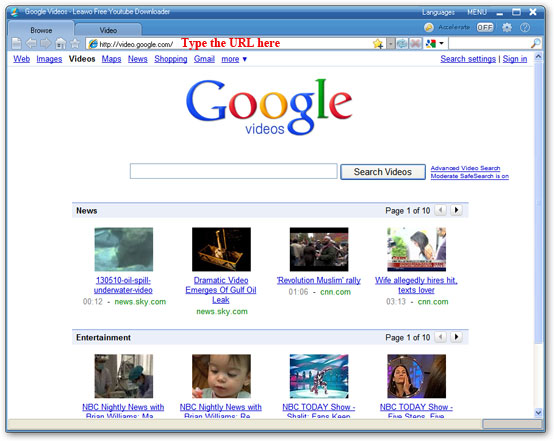
Step 2: Search and choose one Google video to play. A monitor message prompt from the right bottom corner of screen will remind users that a specific video has been found, ignore it or choose "Don't Ask Me Again" to close this prompt dialog. 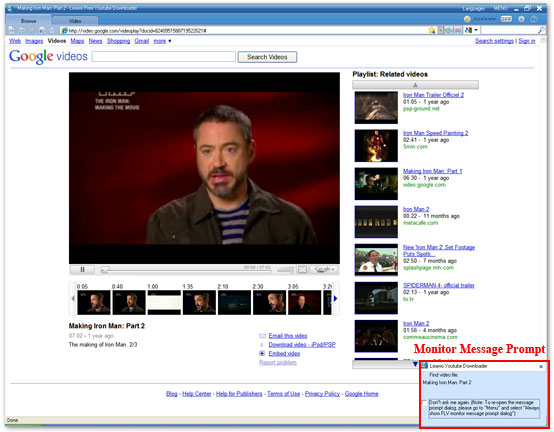
Tips: you can also enter the video key words in the searching bar, and choose the target video site where the searching engine is going to perform the video search.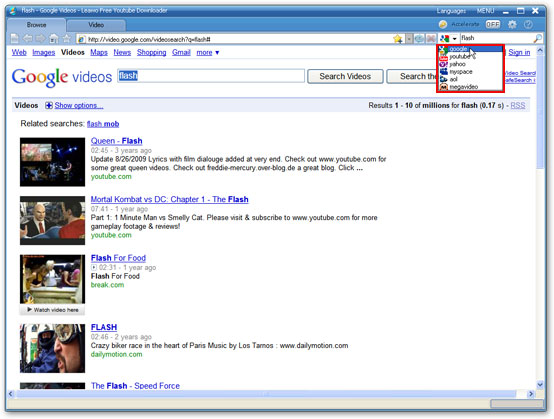
Step 3: Click "Video" tab to check the downloading process of the selected Google video and watch it in the built-in FLV player at the same time.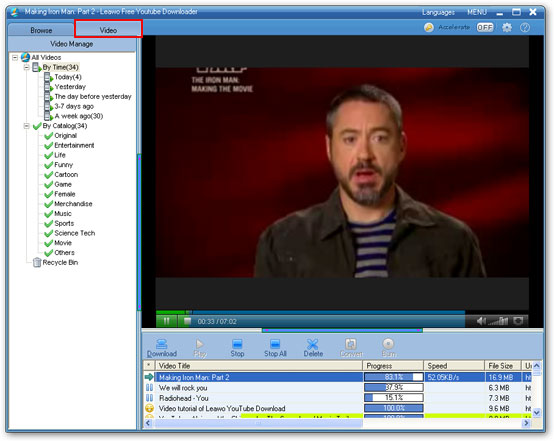
Step 4: When the downloading completes, indicated by a yellow smiley, click "Download" button to save the downloaded Google video to the appointed folder on your PC. A green tick will appear when the saving process is finished.
Step 5: Click "Convert" button to convert the downloaded Google video to AVI if you want the format conversion.

Step 6: Leawo Free FLV Converter will be invoked now. Select AVI as the target video format and click the green button to convert Google video to AVI immediately.
Reshipment from YouTube World.
Friday, October 8, 2010
YouTube Rentals Beta - How to Become a YouTube Partner (Part Two)

The YouTube Rentals Beta I'm going to introduce is a pay-to-view model on YouTube. It provides content owners a new way to generate revenue from their home-made videos on the site. YouTube Rentals allows partners the flexibility to benefit from a variety of videos, complete control over their video content and pioneering use of the world's largest online video community.
(Want to download videos from YouTube and all other video sites? Just use Leawo Free YouTube Downloader.)
Currently, the YouTube Rentals Beta service is available only to the content owners in the US.
Want your content on YouTube be available for people to rent? You can Apply Now.
 Create the best rental experience
From the YouTube Rentals service, partners can get unprecedented flexibility and control over monetization, marketing, and distribution for online video.
- Full control of your rights, dissemination of time, rental prices and lease.
- You can choose to provide some content via the ad-supported model or make some free content for promotional purposes, to maximize your control over profit, marketing and distribution strategies.
- Try using different prices, service time and the lease to improve the attractiveness of a specific video.
- You can grow your audience on YouTube, learn what they like to watch, and tailor your content offering by tracking view trends.
 Expand your audience and profit
If you are a YouTube partner, you will be able to benefit from this new revenue opportunities, and expand your influence via the world's largest online video community.
- Learn a new way to distribute and earn profit from your online content. Create a new revenue stream by making video archived, offline video, or new videos available for rent online.
- To communicate directly with your audience, announce new uploaded content or offline published content.
- Exposure to a large audience. YouTube is the largest online video site and the third largest site in the world. (comScore,2009)
If you are already a YouTube partner and still have a question, you can go to the YouTube Rental Support page.
YouTube Rentals Beta - How to Become a YouTube Partner (Part Two) is over. In the next part, I will introduce how to become a YouTube partner.
Thursday, September 30, 2010
How to Become a YouTube Partner (Part One) - Benefits of YouTube Partner
If you have quality original videos and expanding audience on YouTube, you can apply for a YouTube partner to earn money from the plan.
Benefits of YouTube partner
YouTube is the biggest video sharing website in the world. Its traffic is much more than its competitors. (Leawo Free YouTube Downloader is a perfect tool to download and convert videos from YouTube and other websites, click here to read its manual.)
Being a YouTube partner has the following benefits listed below:
1. Revenue
As a YouTube partner, you will be able to enjoy opportunities to create revenue.
Use YouTube's Insight analytics tools to optimize your existing content and create more targeted content to satisfy your audience and advertisers.
3. Protection
YouTube can protect both of your video content and brand.
4. Video quality
YouTube will process your uploaded video in reliable way, and display them on YouTube at the highest resolution as far as possible.
How to Become a YouTube Partner (Part One) is over. In the next part, I'm going to tell you the YouTube video rental plan and how to become a YouTube partner.
Benefits of YouTube partner
YouTube is the biggest video sharing website in the world. Its traffic is much more than its competitors. (Leawo Free YouTube Downloader is a perfect tool to download and convert videos from YouTube and other websites, click here to read its manual.)
Being a YouTube partner has the following benefits listed below:
1. Revenue
As a YouTube partner, you will be able to enjoy opportunities to create revenue.
- Earn money from the embedded advertisement on your video and advertisement beside your video.
- Share income from your video rental.
- Gain the opportunies of co-marketing and branded entertainment with top brand advertiser.
- Use your own marketing channel to sell your own advertisement
Use YouTube's Insight analytics tools to optimize your existing content and create more targeted content to satisfy your audience and advertisers.
- Learn more characteristics of your audience and what they are watching.
- Learn more about how your audience find your video.
- Learn more about how are you and your competitors doing in terms of competition.
- Learn what content you have is the most popular & engaging.
- Tells you where your video is really successful, and where it is not good enough at a video level.
3. Protection
YouTube can protect both of your video content and brand.
- Protects the integrity of your brand through the branded channel options available only to partners.
- In addition, YouTube offers many Content Management tools for copyright protection that anyone may use, regardless of whether they are in a partnership with YouTube.
- Rental of your videos are delivered via secure streaming way, to avoid downloading by other people.
4. Video quality
YouTube will process your uploaded video in reliable way, and display them on YouTube at the highest resolution as far as possible.
- To those videos which are hot and attractive, YouTube will offer HD version accordingly.
- Offers aspect ration of 16:9 for video players.
- Join the ranks of YouTube's other high-quality video providers already in the Partner Program.
How to Become a YouTube Partner (Part One) is over. In the next part, I'm going to tell you the YouTube video rental plan and how to become a YouTube partner.
Subscribe to:
Posts (Atom)


 Posts

