Thursday, September 30, 2010

How to Become a YouTube Partner (Part One) - Benefits of YouTube Partner

If you have quality original videos and expanding audience on YouTube, you can apply for a YouTube partner to earn money from the plan.

Benefits of YouTube partner
YouTube is the biggest video sharing website in the world. Its traffic is much more than its competitors. (
Leawo Free YouTube Downloader is a perfect tool to download and convert videos from YouTube and other websites, click here to read its manual.)

Being a YouTube partner has the following benefits listed below:

1. Revenue

As a YouTube partner, you will be able to enjoy opportunities to create revenue.

  • Earn money from the embedded advertisement on your video and advertisement beside your video.

  • Share income from your video rental.

  • Gain the opportunies of co-marketing and branded entertainment with top brand advertiser.

  • Use your own marketing channel to sell your own advertisement
2. Video statistics analytics

Use YouTube's Insight analytics tools to optimize your existing content and create more targeted content to satisfy your audience and advertisers.

  • Learn more characteristics of your audience and what they are watching.

  • Learn more about how your audience find your video.

  • Learn more about how are you and your competitors doing in terms of competition.

  • Learn what content you have is the most popular & engaging.

  • Tells you where your video is really successful, and where it is not good enough at a video level.

3. Protection

YouTube can protect both of your video content and brand.

  • Protects the integrity of your brand through the branded channel options available only to partners.

  • In addition, YouTube offers many Content Management tools for copyright protection that anyone may use, regardless of whether they are in a partnership with YouTube.

  • Rental of your videos are delivered via secure streaming way, to avoid downloading by other people.

4. Video quality

YouTube will process your uploaded video in reliable way, and display them on YouTube at the highest resolution as far as possible.

  • To those videos which are hot and attractive, YouTube will offer HD version accordingly.

  • Offers aspect ration of 16:9 for video players.

  • Join the ranks of YouTube's other high-quality video providers already in the Partner Program.

How to Become a YouTube Partner (Part One) is over. In the next part, I'm going to tell you the
YouTube video rental plan and how to become a YouTube partner.

Source is YouTube World.

Tuesday, September 28, 2010

How to Download Online Videos

If the online video you come across is played with an Adobe Flash Player, then you may use Leawo Free YouTube Downloader to download it off to your computer! Leawo Free YouTube Downloader is a free all-in-one video downloader which can download videos from YouTube, Google Video, Dailymotion and other video sharing websites as long as they are played with Adobe Flash Player.

Suppose you are going to download videos with this video downloader, the easiest way is to drag the YouTube video thumbnail to the hover window of Leawo Free YouTube Downloader and then the video downloader will begin the downloading automatically.

Of course, you can also type the URL in the program address bar, this applies to all the video sites, for example, Google Video. Browse videos in its built-in FLV player with high speed, then download them to your appointed folder within just a click, and convert them directly to the format you want for your phone and portable media player.

The tutorial below will take YouTube and Google Video respectively for example to show how to free download video.

Step 1: Launch Leawo Free YouTube Downloader, click settings icon, choose "Show hover window on program startup" in "General" tab from the pop-up window.

Step 2: Browse YouTube videos in IE or any browser, choose the one you want to download, and then drag the selected video thumbnail to the hover window of Leawo Free YouTube Downloader.

Step 3: Click "Video" tab to check the video downloading progress. When the downloading completes, double click the downloaded video, you could play it with the built-in player, or click "Download" button to save the downloaded video to your PC.

Step 4: For downloading Google video and other online videos, type the URL in the address bar and choose one Google video to play. Then repeat the Step 3 shown above.

Supported video / audio formats for uploading to YouTube

YouTube accepts a wide range of video formats uploaded by users. The below video formats are all accepted by YouTube. Some of them have the best visual effect on YouTube. You can take a look at them and tune your video formats for YouTube.

List of some well-known formats which YouTube supports:

WebM files (Vp8 video codec and Vorbis Audio codec)
.MPEG4, 3GPP and MOV files - (typically supporting h264 and mpeg4 video codecs and AAC audio codec)
.AVI (Many cameras output this format - typically the video codec is MJPEG and audio is PCM)
.MPEGPS (Typically supporting MPEG2 video codec and MP2 audio)
.WMV
.MP4
.FLV (Adobe - FLV1 video codec, MP3 audio)

YouTube accepts all of the above video formats uploaded from users. To most users, we find that the below video settings have the best visual effect:
Video format: H.264, MPEG-2 or MPEG-4 recommended
Aspect ratio: Original screen aspect ration without top or bottom black border, for example, 4:3, 16:9
Resolution: 640x360 (16:9) or 480x360 (4:3) Recommended
Audio format: MP3 or AAC Recommended
FPS (Frame per second): 30
Video length limit: 15 minutes (2 to 3 minutes recommended)
Video size limit: 1 GB

Tips:
a. If you think your video won't be accepted by YouTube, you can convert it to video format MPEG4 with audio format MP3 to get the best visual effect.

b. To convert any video format to the 'YouTube supported video formats', you can use some free or paid video converter. Good Freeware for this purpose are FormatFactory or FFMPEG. The former is graphic user interface, while the latter is command line user interface.

c. By default, Windows Movie Maker will save your video item as . MSWMM file. MSWMM is project file, which is not accepted by YouTube on uploading. To upload your Windows Movie Maker video to YouTube, please choose 'save it to my computer' option to save your video project as an accepted video format, and then you can upload the saved video to YouTube.

d. To download videos from YouTube, you can use Leawo Free YouTube Downloader, which is free and clean.

Source is YouTube World.

Saturday, June 12, 2010

waka waka - Shakira's song for the 2010 FIFA World Cup South Africa

Are you ready to the imminent 2010 FIFA World Cup South Africa? Because this great quadrennial worldwide football game is coming today on Jun. 11, 2010!

The World Cup theme song - waka waka (This Time For Africa), is created and sang by Shakira, a famous Colombia Latin singer. Waka waka is a verb in the language of Creole in Africa, its meaning is "flame, shine, warmly burn". Added the the South Africa's guitar solo background music with rhythm , this song has a strong flavor of Africa. Shakira will performance this song together with South Africa's local band Freshlyground on this World Cup closing ceremony.

As the World Cup theme song singer, the Latin singing queen Shakira said, "African music has the power of inspiring, and be reckoned in the global popular culture. I'm very proud that waka waka (This Time For Africa) is chosen to be the theme song of 2010 FIFA World Cup South Africa. FIFA World Cup is a worldwide game; it closely links together people from different countries, different races and different area, which is what I want to express in this song." At the same time, she is very happy to cooperate with the most famous band in South Africa - Freshlyground.

Below is the music video by Shakira featuring Freshlyground performing Waka Waka (This Time for Africa) (The Official 2010 FIFA World Cup (TM) Song). (C) 2010 Sony Music Entertainment on YouTube. You can use Leawo Free YouTube Downloader to download this music video to your computer hard disk.

Source is
http://youtubeking10.blogspot.com/2010/06/waka-waka-shakiras-song-for-2010-fifa.html

Friday, May 28, 2010

Top 10 must have software in your computer

What are your must have programs in your computer? You need the applications when you have a computer and you can die without it.

This is my top 10 list

1. Windows XP:) Of cource, this is Operationg System, you cannot run any program without it.

2. Microsoft Office. Mine is 2003. 2007 and 2010 are available on the Internet.

3. Web Browser. I use Mozilla Firefox 3.5.9 currently. Mozilla Firefox supports a lot of plugins, so it is very strong. Though IE still has the biggest market share, I don't like IE.

4. Real - time chat tool: Windows Live! Messenger

5. Leawo YouTube Downloader. It is an entertainment application, and is free. I use it to download and accelerate web videos.

6. FlashGet

7. Kaspersky Internet Security. It is the best antivirus software on the planet.

8. VLC media player. This player can open and almost all video files.

9. Adobe Reader 9.0, e-book reader. It can read PDF and other e-book files.

10. RoboForm. It can remember your account names and passwords and automatically fill login forms.

After top 10

11. War Craft 3 -->> entertainment apps :)

12. Format Factory. It can convert almost all videos and is totally free.

13. Winrar, zip and unzip files

14. Adobe Photoshop, the best photo editors

15. Foxmail, e-mail manager, write and receive e-mails.

16. gimp

17. iTunes music player

Source is http://youtubeking10.blogspot.com/2010/05/top-10-must-have-software-in-your.html

Wednesday, May 26, 2010

Top Ten YouTube videos: the highest one with 186 million views

ReadWriteWeb, the famous United States blog named a "Top Ten YouTube videos" list in January this year. "Hari's comedy act" headed in the list with 186 million times views.

These top ten videos are as follows:

1. Hari's comedy act (186,361,277 views by January)

2. Charlie bit my finger - again! (148,757,751 views by January, 188,307,246 views by now)
3. Evolution of Dance (134,412,139 views by January, 143,163,641 views by now)

4. Miley Cyrus - 7 Things - Official Music Video (108,577,069 views by January, 118,135,172 views by now)

5. Jeff Dunham - Achmed the Dead Terroris (104,013,553 views by January, 111,796,626 views by now)

6. Hahaha - Small daring boy (103,262,937 views by January, 118,908,247 views by now)

7. Lo que tú Quieras Oír (99,291,111 views, 100,699,985 views by now)

8. Pitbull - I Know You Want Me (92,408,735 views by January, 119,630,385 views by now)

9. Britains Got Talent 2009 (85,126,780 views by January, 92,375,341 views, embed code not permitted)
http://www.youtube.com/watch?v=9lp0IWv8QZY

10. Timbaland – Apologize (81,299,096 views by January, 85,274,802 views by now)

To get smooth view of these top ten YouTube videos or HD videos, and download YouTube for free,you can use this free YouTube Downloader. It can eliminate buffering of video, and download almost all videos from the Internet.

Source is http://youtubeking10.blogspot.com/2010/05/top-ten-youtube-video-highest-one-with.html

Thursday, September 24, 2009

Customize a Flash Video Player with playlist in the easiest way

Many people think it’s very difficult to realize playing videos on their own website, blog, forum or e-store, because it’s difficult for them, who don’t know any coding knowledge, to customize an own-branded web Flash video player like YouTube player for web. So if they want to play videos on their own website, they have to compress their videos size to 10 mins or smaller and upload to YouTube, and then get the embed codes of the videos for embedding onto website. Although they know the drawbacks like the videos will belong to YouTube, the video quality will be lower, etc.

In fact, it’s not difficult to customize a skinning web FLV player any more. Here, I will introduce a way to customize a skinning web FLV player with full-screen capability and playlist. At present, this way is the easiest one, which only needs a few mouse clicks.

Below is the tutorial shows how to customize the above flash video player with a few mouse-clicks on Moyea Web Player.

Step 1: Open Moyea Web Player on your PC

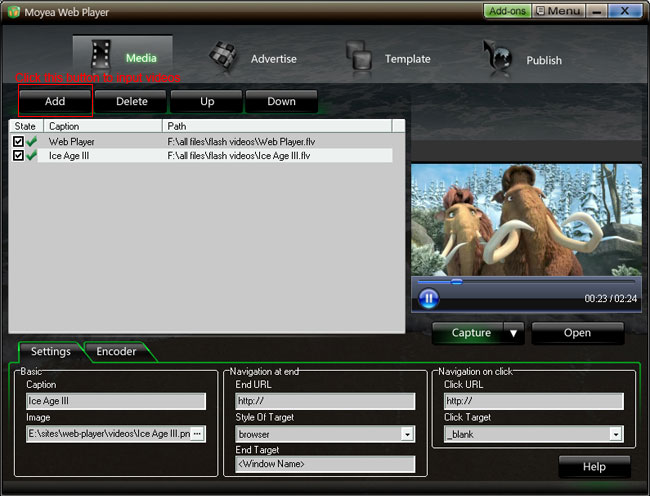
Step 2: Input flash videos you want to play on webpage into Moyea Web Player (If your videos are not flash videos, please convert them to).

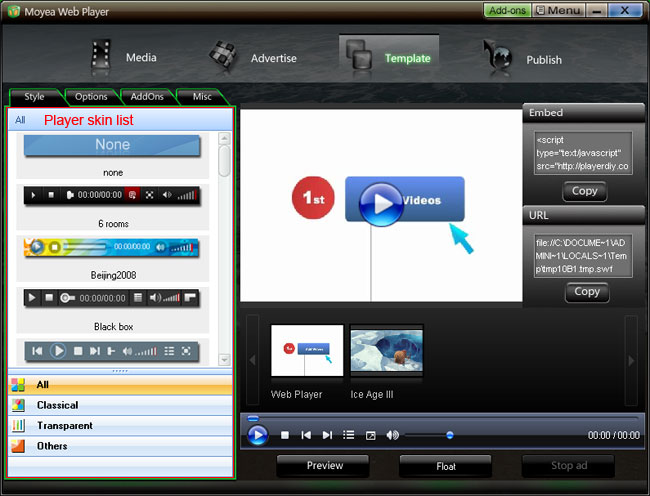
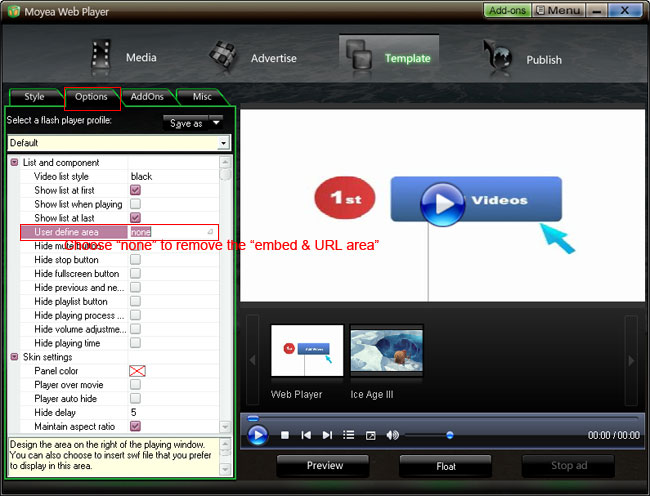
Step 3: Choose a player skin(here, I use the default one), and remove the embed code area.


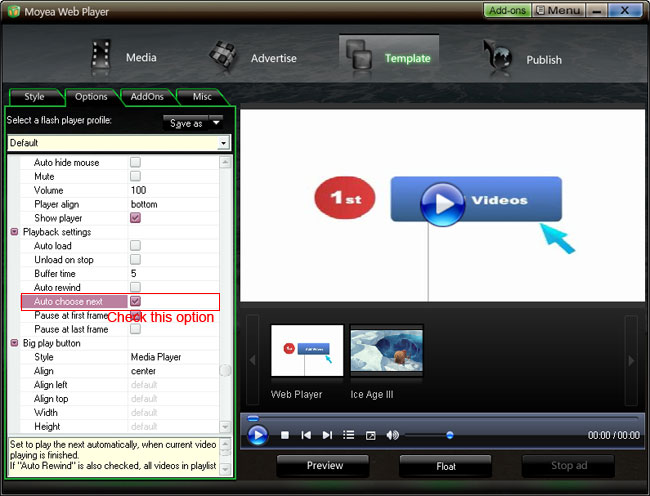
Check "Auto choose next" to make the player can player next video automatically

Step 4: Click “Publish” button to generate a web flash video player and other related files (Note: if you want to get a separate playlist file, please check “Out File”)

Step 5: Upload all the published files except the index.html file, to the same folder of your web server

Step 6: Embed the generated web video player onto your webpage with the embed code below (you can get it on the generated index.html file):


Player will show here

Note:
1. No tag outside the embed code.

2. mwplayer.swf is the actual flash video player. If it resides in another directory, then point to it with a relative path (e.g. /player/mwplayer.swf) or an absolute path (e.g. http://www.yourdomain.com/player/mwplayer.swf ).
For example:


Player will show here

3. '500','450' is the width and the height of the player, you could change them to change the player size.

Step 7: The flash video player will appear on your website. Have a look at the above demo.